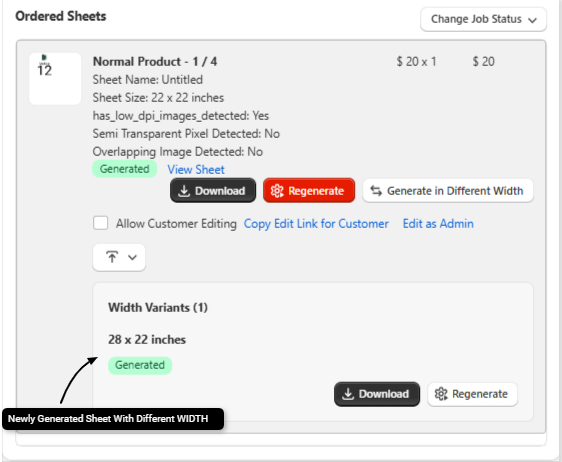
How Admins Can Generate a Sheet into different Width Size?

Kixxl allows admins to generate gang sheets in a different sheet size than the one originally ordered by the customer. This feature is designed for situations where the requested sheet size is temporarily unavailable. 

For example, if a customer orders a 22 × 24 inch sheet but that sheet size is out of stock, the admin can generate the same artwork on an available sheet instead. i.e 26 × 24 inch. 

Changing the sheet size does not affect:

  • The design dimensions
  • The print quality
  • The customer’s order total or pricing


This feature is intended solely to provide production flexibility for admins and help prevent delays when certain sheet sizes are unavailable.

How Admins Can Generate a Sheet in a Different Size?

  1. Go to KixxlOrders 
  2. Open the required order.
  3. Click Generate in Different Width button.
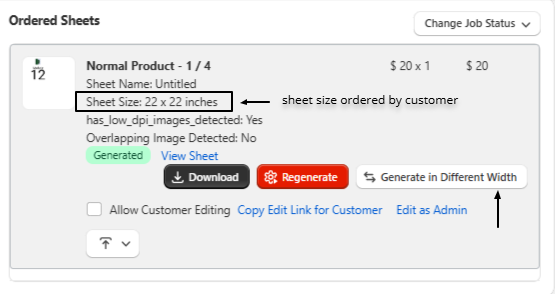
generate sheet in different width

4. Enter the targeted Width and Height (in inches).
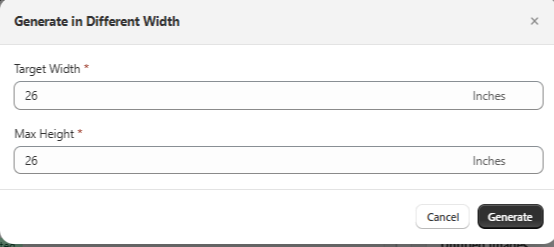
 

5. Click Generate. The newly generated sheet will appear within the same order details. After the sheet is generated, admins can:

  • Download the newly generated sheet.
  • Regenerate the sheet with different dimensions if needed.
  • Continue managing the new sheet from the same order without affecting the original customer order.
ON THIS PAGE