How Kixxl Scans for Image Quality & Artwork Issues in a Customer Order?
Updated
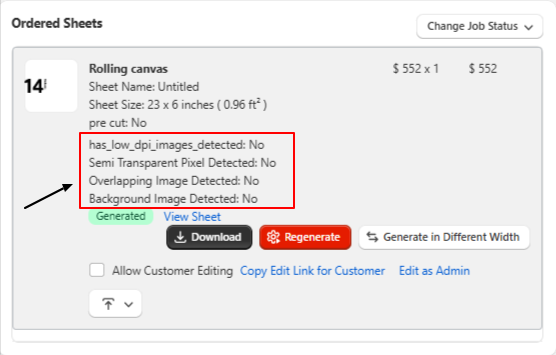
Whenever a customer uploads designs or images to create a gang sheet, Kixxl automatically scans the artwork for potential quality and print issues.If any issues are detected, they are displayed on the Order Details page for the corresponding order line item. Examples include:
Image Has Semi-Transparent Pixels: Yes/No
Low DPI Images Detected: Yes/No
Overlapping Images Detected: Yes/No
This allows the admin to identify and resolve artwork issues before the order is sent for printing.
Fixing the Artwork Issues
Admins can edit the artwork directly by clicking Edit as Admin option, which opens the design in the Kixxl Editor for modifications. If enabled by the admin, customers can also fix their own artwork. To do this, the admin can click Copy Edit Link for Customer and share the generated link with the customer. The customer can then open the design in the Kixxl Editor, make the required changes, and save the updated artwork. These warnings help ensure your artwork is print-ready and reduce the chances of poor print quality or production errors.