Kixxl: Installation Guide for Shopify
This article shows how to install and configure Kixxl on a Shopify store so you can start creating gang sheets, managing single prints, and fulfilling orders through Kixxl. Pre-requisites: Ensure you’re logged into your Shopify store. Products are already created (added) inside your Shopify store. 1. Install Kixxl from Shopify App Store Open your Shopify […]
Products Type & Customization
This guide walks you through the step-by-step process of configuring the Normal/Variant product type in Kixxl, ensuring it functions correctly within the Kixxl Builder. To Configure Normal / Variant Product type in Kixxl: Ensure your login and the Kixxl Installation to your Shopify store. 1. Access the Product Go to Kixxl and select Products from […]
How to Remove A Colour from Your Designs/Images?
when you upload images on Kixxl builder (editor), you can remove color from that design/image in two ways: Using the Remove Color feature. Using the Knockout Color feature. Using the Remove Color Feature 1. Right-click on the image and select the Remove color option. Choose the color you want to remove. 2. You can also type […]
How To Remove Image Background in Kixxl Editor?
Image Background Detection & Removal Feature In Kixxl builder (editor), Image Background detection & removal is a feature that automatically detects and remove the unwanted background from an uploaded image, leaving only the main artwork, logo, or design visible. It ensures that your design looks clean and professional when placed on a gang sheet. How […]
How does Adding “Sheet Details” Make Print Tracking easier In Kixxl?
Print Tracking With Sheet details: You can add sheet details such as sheet name, order number, customer information, or any additional details while creating gang sheets. These details are linked to each sheet, making it much easier to track, manage, and organize print jobs. For example, adding sheet details like Customer Name + Order ID […]
Enabling “Free Move” vs “Fixed Placement” In Kixxl
What is Free Move feature? Free move setting allow customers to move outside the canvas of Kixxl editor. With this setting enabled, customers can drag and place their designs anywhere on the gang sheet without restrictions. You can rotate, resize, and position elements freely. It gives complete control over layout customization. Free Move Vs. Fixed […]
How to Configure Allowed File Types for Uploads?
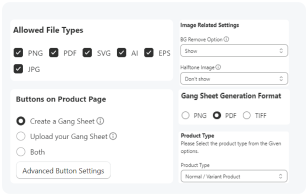
What are “Allowed File Types”? In Kixxl, the Allowed File Types are the formats of design/image that customers can upload into the editor. By defining which files types are allowed to upload, Kixxl ensures smooth uploading, editing, and exporting of designs without compatibility issues. Which File Formats are Allowed for Upload? PNG: Supports transparency, best […]
Variant Selection on Auto Build: AI vs. Customer Selection
This setting controls how different image sizes or variants are arranged on a gang sheet during Auto Build (automatic sheet generation). Here, you have two options: Letting AI decide & Customer selection. Letting AI Decide: Kixxl’s AI automatically choose the best image size to fit the selected sheet dimensions. It ensures a uniform layout where […]
How to Configure Auto-Rotate for Large Images in Kixxl?
Auto-Rotate in Kixxl: In the Kixxl editor, the Auto Rotate feature automatically rotates bigger images or designs to fit more efficiently on a gang sheet. If the image is too large for the sheet, it won’t be added. Instead of leaving designs in their original orientation, the editor adjusts them with auto-rotate to minimize wasted […]
How to Configure Buttons on Product Page?
Buttons on Product Page: While setting up products in Kixxl, you can configure different buttons that customers see on the product page. These buttons define how customers interact with Kixxl. 1. “Create a Gang Sheet” button This button opens the Kixxl Editor for the customer. Customers can design their own gang sheet by uploading artwork, […]